
Möbeldichte-Steuerung: Inszenieren Sie jeden Raum auf Ihre Art
Steuern Sie genau, wie viel Möbel in Ihren inszenierten Fotos erscheint - von luftiger Minimalistik bis zu reich geschichteten Räumen.
Warum die Möbelmenge wichtig ist
Nicht jeder Raum braucht die gleiche Inszenierung. Ein Käufer, der sich eine gemütliche Studio-Wohnung ansieht, möchte sehen, wie der Raum atmet. Ein luxuriöses Wohnzimmer braucht geschichtete Sitzmöbel und kuratierte Deko. Ein Flur braucht nur einen Hauch von Wärme.
Deshalb gibt Ihnen Stagedly einen einfachen Schieberegler, mit dem Sie die perfekte Möbeldichte für jedes Foto einstellen.
Keine Einheitslösungen mehr. Keine überladenen Küchen oder leer wirkenden Schlafzimmer. Sie haben die Kontrolle.
So funktioniert es
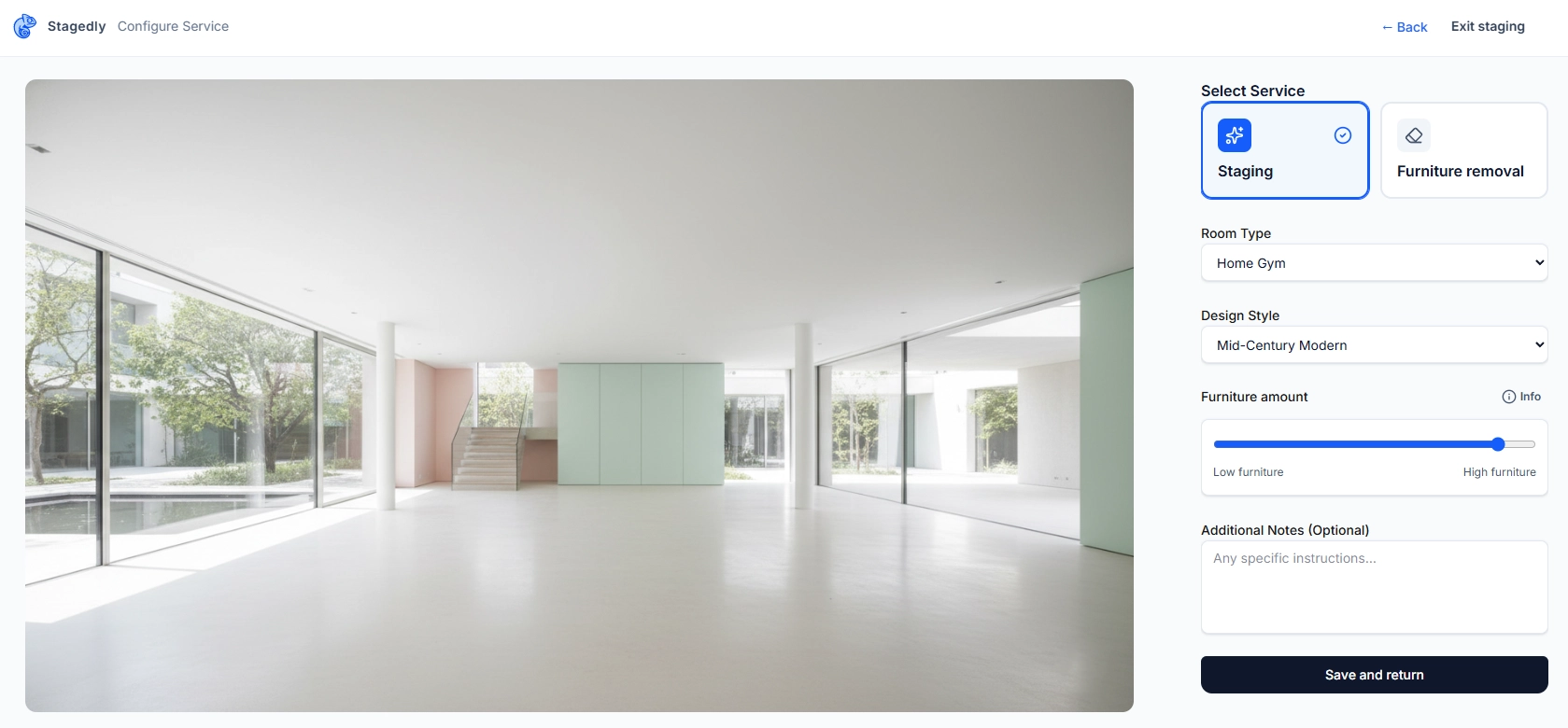
Wenn Sie ein Raumfoto hochladen und den AI Staging-Service auswählen, sehen Sie den Möbelmenge-Schieberegler. Ziehen Sie ihn von 0% bis 100%, um der KI genau zu sagen, wie dicht oder minimal die Inszenierung sein soll.
Die KI interpretiert Ihre Wahl und platziert Möbel entsprechend, wobei Laufwege frei bleiben und der Raum funktional bleibt.
Den Möbelschieberegler nutzen: Schritt für Schritt
Laden Sie Ihr Raumfoto hoch
Wählen Sie AI Staging als Service
Raumtyp und Stil auswählen
Aus den Dropdowns wählen
Den Möbelmenge-Schieberegler finden
Unterhalb des Stil-Selectors
Zum Anpassen ziehen
Links für minimal, rechts für voller
Für Details darüberfahren
Info-Button zeigt die Dichtebeschreibung
Speichern und zurück
Einstellungen übernehmen
Die fünf Inszenierungsstufen
Wählen Sie die perfekte Dichte für Ihren Raum
Ultra-minimal
0-10%"Ein paar Ankerstücke, maximale Luftigkeit."
Perfekt für:
- Architektonische Merkmale hervorheben
- Kleine Räume, in denen weniger mehr ist
- Moderne/minimalistische Listings
- Räume, in denen die Struktur glänzen soll
Beispiel: Ein einzelner Statement-Sessel, ein schlanker Konsolentisch und sonst nichts.
Leichte Inszenierung
11-30%"Nur wenige Schlüsselteile mit viel freiem Raum."
Perfekt für:
- Studios und kompakte Apartments
- Flure, Wintergärten und Übergangsräume
- Käufer, die sich eigene Möbel vorstellen möchten
- Saubere, luftige Fotoästhetik
Beispiel: Ein Sofa und ein Couchtisch im Wohnzimmer, aber keine Beistellstühle, kein Teppich, keine Wandkunst.
Ausgewogene Inszenierung
31-60%"Eine moderate Anzahl an Stücken mit atmungsaktivem Layout."
Perfekt für:
- Die meisten Wohnimmobilien
- MLS-fertige Fotos, die "einzugsbereit" wirken
- Räume, die funktional, aber nicht überfüllt wirken sollen
- Unsere beliebteste Einstellung - der Sweet Spot
Beispiel: Sofa, Couchtisch, Akzentstuhl, Teppich und ein paar Accessoires.
Volle Inszenierung
61-85%"Eine reiche Auswahl an Stücken bei freien Laufwegen."
Perfekt für:
- Luxus-Listings, die beeindrucken sollen
- Große Räume, die sonst leer wirken
- Lifestyle-Marketing (Social Media, Broschüren)
- Ein aspiratives "Traumhaus"-Gefühl schaffen
Beispiel: Geschichtete Sitzmöbel, Beistelltische, Stehlampen, Kunst, Pflanzen und kuratierte Regaldeko.
Maximale Inszenierung
86-100%"Geschichtete Sitzmöbel und Deko, aber dennoch aufgeräumt mit klaren Wegen."
Perfekt für:
- Hochwertige Immobilien mit großzügigen Räumen
- Editorial- oder Magazin-Fotografie
- Käufer, die das volle Lifestyle-Potenzial sehen wollen
- Räume, die fürs Bewirten gedacht sind
Beispiel: Mehrere Sitzbereiche, gestylte Bücherregale, Statement-Beleuchtung und Designer-Accessoires.
Vorteile der Möbeldichte-Steuerung
Auf den Raum zugeschnitten
Ein Bad braucht nicht dasselbe Staging wie ein Wohnzimmer. Regler nach unten oder oben.
Entspricht Käufererwartungen
Luxuskäufer wollen Opulenz sehen. Minimalisten wollen Raum sehen.
Schnellere Freigaben
Holen Sie sich den Look beim ersten Versuch - ohne Hin und Her.
Konsistent über Listings hinweg
Setzen Sie die gleiche Dichte für alle Fotos einer Immobilie für einen einheitlichen Look.
Funktioniert mit jedem Stil
Egal ob skandinavisch oder luxuriös, der Dichte-Regler passt sich an.
Pro-Tipps
Allgemeine Richtlinien
- Starten Sie bei 50%, wenn Sie unsicher sind - das ist die vielseitigste Einstellung
- Gehen Sie niedriger bei kleinen Räumen - Studios, Flure und Bäder funktionieren am besten bei 20-40%
Raumgröße zählt
- Gehen Sie höher bei großen Räumen - großzügige Wohnzimmer und Master-Suiten vertragen 70-90%
- Passen Sie den Preis der Immobilie an - Luxus-Listings profitieren von vollerem Staging
Stil-Überlegungen
- Minimalistische und skandinavische Stile sehen oft bei geringerer Dichte am besten aus
- Traditionelle und bohemian Stile glänzen mit mehr Stücken
Käuferpsychologie
- Starterhäuser wirken mit leichterem Staging zugänglicher
- Luxuskäufer erwarten Opulenz und Lifestyle-Potenzial
Bereit, auf Ihre Art zu inszenieren?
Laden Sie Ihre Raumfotos hoch, wählen Sie Ihren Stil, und stellen Sie die perfekte Möbelmenge ein. Mit Stagedly bekommt jeder Raum genau das Staging, das er verdient.
Jetzt inszenierenFragen zur Möbeldichte oder anderen Staging-Präferenzen? Besuchen Sie unsere FAQs oder kontaktieren Sie den Support.