
Contrôle de densité du mobilier : Mettez en scène chaque pièce à votre façon
Contrôlez précisément la quantité de mobilier dans vos photos mises en scène - du minimalisme aérien aux espaces riches en couches.
Pourquoi la quantité de mobilier compte
Toutes les pièces n'ont pas besoin du même niveau de mise en scène. Un acheteur qui regarde un studio cosy veut voir comment l'espace respire. Un salon de luxe exige des assises en couches et une déco soignée. Un couloir n'a besoin que d'une touche de chaleur.
C'est pourquoi Stagedly vous donne un curseur simple pour régler la densité parfaite de mobilier pour chaque photo.
Fini les résultats uniformes. Fini les cuisines surchargées ou les chambres qui paraissent vides. Vous gardez le contrôle.
Comment ça marche
Lorsque vous téléversez une photo de pièce et sélectionnez le service AI Staging, vous voyez le curseur Quantité de mobilier. Faites-le glisser de 0% à 100% pour indiquer à l'IA la densité souhaitée.
L'IA interprète votre choix et place le mobilier en conséquence tout en gardant les passages dégagés et la pièce fonctionnelle.
Utiliser le curseur de mobilier : pas à pas
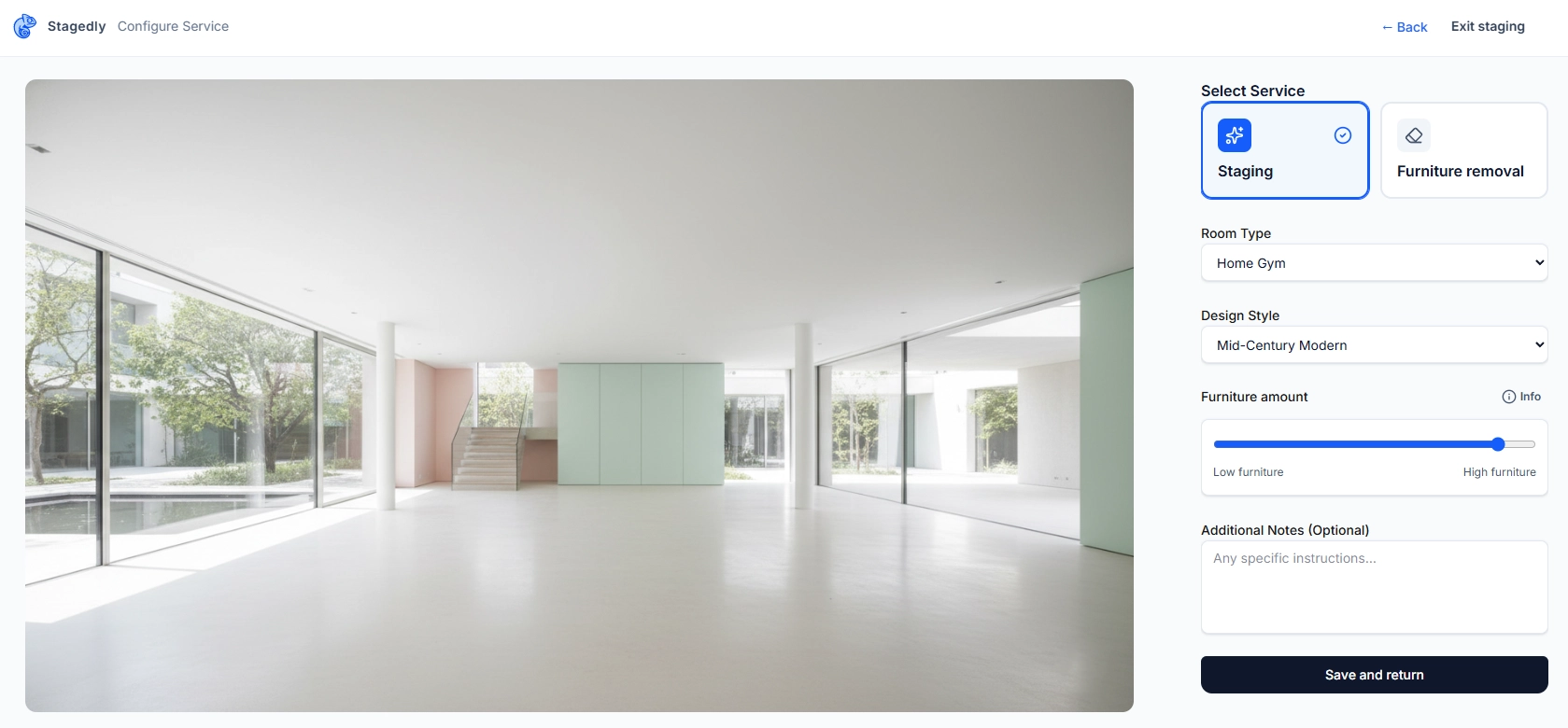
Téléversez votre photo de pièce
Sélectionnez AI Staging comme service
Choisissez le type de pièce et le style
Choisissez dans les menus déroulants
Trouvez le curseur Quantité de mobilier
Situé sous le sélecteur de style
Faites glisser pour ajuster
À gauche pour minimal, à droite pour plus fourni
Survolez pour les détails
Le bouton Info affiche la description de densité
Enregistrez et revenez
Appliquez vos préférences
Les cinq niveaux de mise en scène
Choisissez la densité parfaite pour votre pièce
Ultra-minimal
0-10%"Quelques pièces d'ancrage, un maximum d'espace."
Parfait pour :
- Mettre en valeur les éléments architecturaux
- Petits espaces où moins, c'est mieux
- Annonces modernes et minimalistes
- Pièces où la structure doit briller
Exemple : Une chaise statement, une console fine et rien d'autre.
Mise en scène légère
11-30%"Quelques pièces clés avec beaucoup d'espace libre."
Parfait pour :
- Studios et appartements compacts
- Couloirs, vérandas et espaces de transition
- Acheteurs qui veulent imaginer leurs propres meubles
- Esthétique photo propre et aérienne
Exemple : Un canapé et une table basse dans le salon, mais pas de fauteuils d'appoint, pas de tapis, pas d'art mural.
Mise en scène équilibrée
31-60%"Un nombre modéré de pièces avec un agencement respirant."
Parfait pour :
- La plupart des annonces résidentielles
- Photos prêtes MLS qui semblent "prêtes à emménager"
- Pièces qui doivent paraître fonctionnelles sans être chargées
- Notre réglage le plus populaire - le juste milieu
Exemple : Canapé, table basse, fauteuil d'accent, tapis et quelques accessoires.
Mise en scène complète
61-85%"Un ensemble riche de pièces tout en gardant les passages ouverts."
Parfait pour :
- Annonces de luxe qui doivent impressionner
- Grandes pièces qui paraîtraient vides sinon
- Marketing lifestyle (réseaux sociaux, brochures)
- Créer une ambiance de "maison de rêve"
Exemple : Assises en couches, tables d'appoint, lampadaires, art, plantes et déco d'étagères soignée.
Mise en scène maximale
86-100%"Assises et déco en couches, mais sans encombrement et avec des chemins clairs."
Parfait pour :
- Biens haut de gamme avec de vastes pièces
- Photographie éditoriale ou magazine
- Acheteurs qui veulent voir tout le potentiel lifestyle
- Pièces conçues pour recevoir
Exemple : Plusieurs zones d'assise, bibliothèques stylées, éclairage statement et accessoires design.
Avantages du contrôle de densité
Adapté à la pièce
Une salle de bain n'a pas besoin du même staging qu'un salon. Montez ou baissez.
Correspond aux attentes des acheteurs
Les acheteurs de luxe veulent voir l'opulence. Les minimalistes veulent voir l'espace.
Approbations plus rapides
Obtenez le look voulu du premier coup - sans aller-retour.
Cohérent sur tout le bien
Définissez la même densité pour toutes les photos d'un bien pour un rendu cohérent.
Fonctionne avec tous les styles
Que vous choisissiez Scandinavian ou Luxury, le curseur s'adapte.
Conseils pro
Recommandations générales
- Commencez à 50% si vous hésitez - c'est le réglage le plus polyvalent
- Baissez pour les petits espaces - studios, couloirs et salles de bain fonctionnent mieux à 20-40%
La taille de la pièce compte
- Augmentez pour les grandes pièces - grands salons et suites principales supportent 70-90%
- Alignez avec le prix du bien - les biens de luxe profitent d'une mise en scène plus fournie
Considérations de style
- Les styles minimalistes et scandinaves sont souvent meilleurs à faible densité
- Les styles traditionnels et bohèmes brillent avec plus de pièces
Psychologie des acheteurs
- Les maisons d'entrée de gamme paraissent plus accessibles avec une mise en scène légère
- Les acheteurs de luxe attendent l'opulence et le potentiel lifestyle
Prêt à mettre en scène à votre façon ?
Téléversez vos photos, choisissez votre style et réglez la quantité parfaite de mobilier. Avec Stagedly, chaque pièce reçoit exactement la mise en scène qu'elle mérite.
Commencer à mettre en scèneDes questions sur la densité de mobilier ou d'autres préférences ? Consultez nos FAQs ou contactez le Support.